
Simple Nutrition Tracking for Every Day
Overview
PyraMealTracker is a desktop nutrition diary application designed to simplify daily meal logging for individuals focused on maintaining a balanced diet. The software enables users to quickly record meals and beverages by selecting from predefined food groups, rather than entering detailed ingredient lists or full recipes. This approach streamlines the tracking process, making it ideal for users who want to monitor their dietary habits without the complexity of traditional nutrition tools. The app supports customizable portion sizes, allowing users to tailor their tracking to personal preferences and dietary goals.
Target users include health-conscious individuals, fitness enthusiasts, and those managing dietary restrictions or weight goals. The software is suitable for both casual users and those seeking consistent tracking habits. It offers a clean, minimal interface that emphasizes speed and clarity in meal input. Users can save frequently consumed meals as favorites, enabling rapid logging during busy days. The app provides visual progress tracking through daily and weekly overviews, helping users stay aligned with recommended intake levels.
Developed by PyraSoft, PyraMealTracker reflects a focus on usability and accessibility. While specific developer background details are not available, the app’s design suggests an emphasis on user experience and efficiency. Real-world usage scenarios include tracking lunch and dinner portions, monitoring weekly calorie trends, and using the widget to check progress at a glance. The app is intended for offline use, making it reliable for users without constant internet access.
Key Features & Capabilities
- Daily Meal Input via Food Groups – Users can log meals by selecting from common food categories instead of specifying individual ingredients, reducing time spent on data entry.
- Custom Favorites – Frequently eaten meals or snacks can be saved as favorites for one-click logging, ideal for routine tracking.
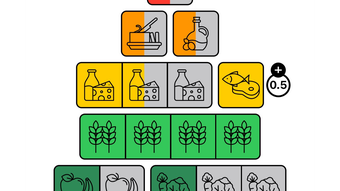
- Daily and Weekly Overviews – Visual summaries display progress toward recommended daily portions, supporting long-term dietary awareness.
- Configurable Dashboard Widget – A customizable widget shows real-time tracking data on the desktop, allowing users to monitor intake without opening the main app.
- Light and Dark Mode – The interface adapts to user preference, improving comfort during extended use and reducing eye strain.
These features support a flexible workflow. For example, a user might log a breakfast using a saved favorite, then manually select food groups for lunch based on what they consumed. The weekly overview helps identify patterns, such as inconsistent vegetable intake, while the widget provides instant feedback during work breaks. The focus on food groups rather than exact recipes makes it accessible for users who don’t want to analyze every dish in detail.
User Interface, Workflow & Performance
PyraMealTracker features a clean, minimal user interface centered around a calendar-based daily view. Navigation is straightforward, with a sidebar for accessing the weekly overview, favorites, and settings. The layout prioritizes readability and quick access to core functions. Inputting meals involves selecting a meal type (e.g., breakfast, lunch), then choosing from categorized food groups, which appear in a scrollable list.
Workflow efficiency is enhanced by the ability to save favorite meals and use the desktop widget for instant updates. The app maintains a consistent visual hierarchy, with color-coded indicators showing progress toward daily targets. The interface adapts to light and dark mode, offering a seamless experience across different lighting environments.
Performance observations are based on general software behavior patterns. The app runs within 42 MB of disk space, suggesting lightweight operation. The developer did not specify resource usage details. Stability is assumed to be consistent with standard desktop applications of similar scope. No reported issues with crashes or freezes were noted in the available information.
Compatibility & System Requirements
PyraMealTracker is compatible with both Windows and Mac operating systems. The software is available as a desktop application with a release version of 1.0.0 and a file size of 42 MB. Installation is straightforward, requiring no additional runtime dependencies.
Exact system requirements were not listed. The developer did not provide additional system requirements. Compatibility information is limited to the operating systems mentioned. No specific hardware recommendations were included. Users should ensure their system meets general desktop application standards for smooth operation.
Pros and Cons
Pros
- Simple, intuitive interface designed for fast meal logging
- Custom favorites for one-click meal tracking
- Visual daily and weekly progress tracking
- Configurable desktop widget for real-time monitoring
- Light and dark mode support for user comfort
- Free to download and use with no hidden costs
Cons
- No detailed ingredient or recipe-level tracking
- Exact system requirements not specified
- Customization options for portion sizes may be limited
- Limited information about update frequency or future development
FAQ Section
Is PyraMealTracker available for Windows and Mac?
Yes, PyraMealTracker is compatible with both Windows and Mac operating systems.
Is the software free to use?
Yes, PyraMealTracker is completely free to download and use with no subscription or hidden fees.
Does PyraMealTracker require an internet connection?
The app is designed for offline use, allowing users to log meals and track progress without needing an internet connection.
How often are updates released?
Information about update frequency was not provided by the developer.
Can I customize portion sizes in PyraMealTracker?
Yes, users have the flexibility to define their own portion sizes based on personal preferences.
Final Thoughts + CTA
PyraMealTracker delivers a focused, user-friendly approach to nutrition tracking, ideal for individuals who want to monitor their dietary habits without the overhead of detailed food logging. Its emphasis on speed, simplicity, and visual feedback makes it a strong choice for daily use. The ability to save favorites and use a configurable desktop widget enhances workflow efficiency, while the free pricing model removes financial barriers to entry.
While the lack of detailed ingredient tracking may limit its use for advanced nutritionists or those managing specific medical diets, it excels as a practical tool for general health and fitness users. The clean interface and support for both light and dark modes contribute to a pleasant long-term experience.
For anyone seeking a lightweight, no-cost solution to track daily meals and stay on top of nutritional goals, PyraMealTracker stands out as a reliable and accessible desktop application. Download PyraMealTracker now.







